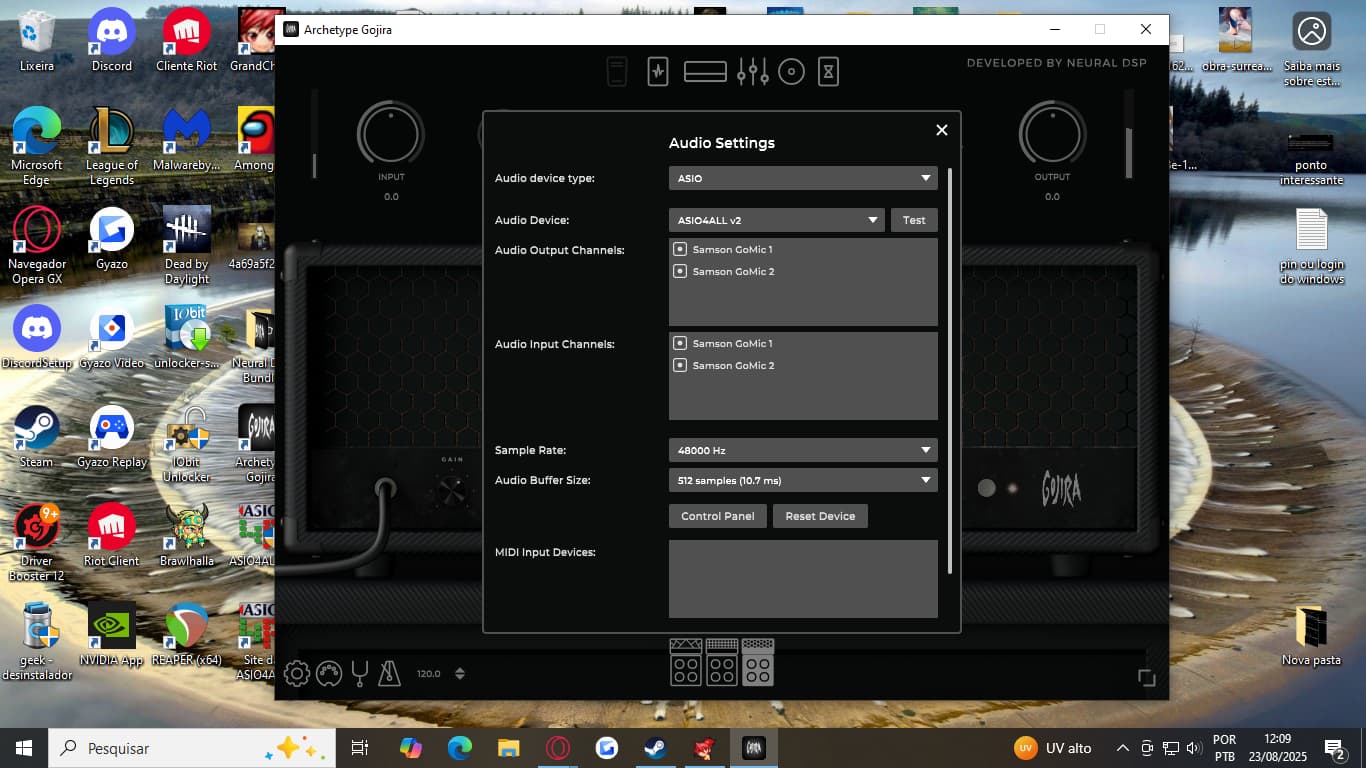
I have no trouble acessing to the audio settings when i open the archetype alone, but for some reason the icon just dosen’t appear on the plugin when i open the VST on the reaper software. Im refering to the gear icon that stays at the bottom left of the archetype interface next to the “MIDI Mappings”.
The icon apper normally when i open archetype by himself but…
as you can see, the audio setting are not showing this time.
I want to use the plugin on the reaper but have to change the audio de audio devide for “ASIO4ALL” and de other output channels because of the latency. Help me! What can i do?
Standalone version of any NDSP plug-in has the settings menu, DAW version of the same plug-in does not. You will need to maintain your driver settings within your DAW.
1 Like
Ok, but how can i do that?
Sorry, I don’t know Reaper. But every major DAW will have a settings menu somewhere that will let you choose your device and/or driver. Certainly Reaper has that.
yes bud, im having a latency problem when i play the guitar in the default way of archetype, but when i change the “Audio device type” to ASIO4ALL the delay goes away. But as you can see in the print below, i only can acess the audio settings normally when i open the plugin without reaper:
So how can i do this through reaper as you said?
Thank you for solving my problem @DDguitars . God bless you
1 Like