Capture levels for amp

I captured the clean and lead versions of my Hughes & Kettner Blue 60-R combo amp.

However, the levels in the QC of these captures is VERY low. I have to crank the volume ALL the way up.

Weird because the levels before capturing looked good. They peaked at a little below the hashmark in the meter.

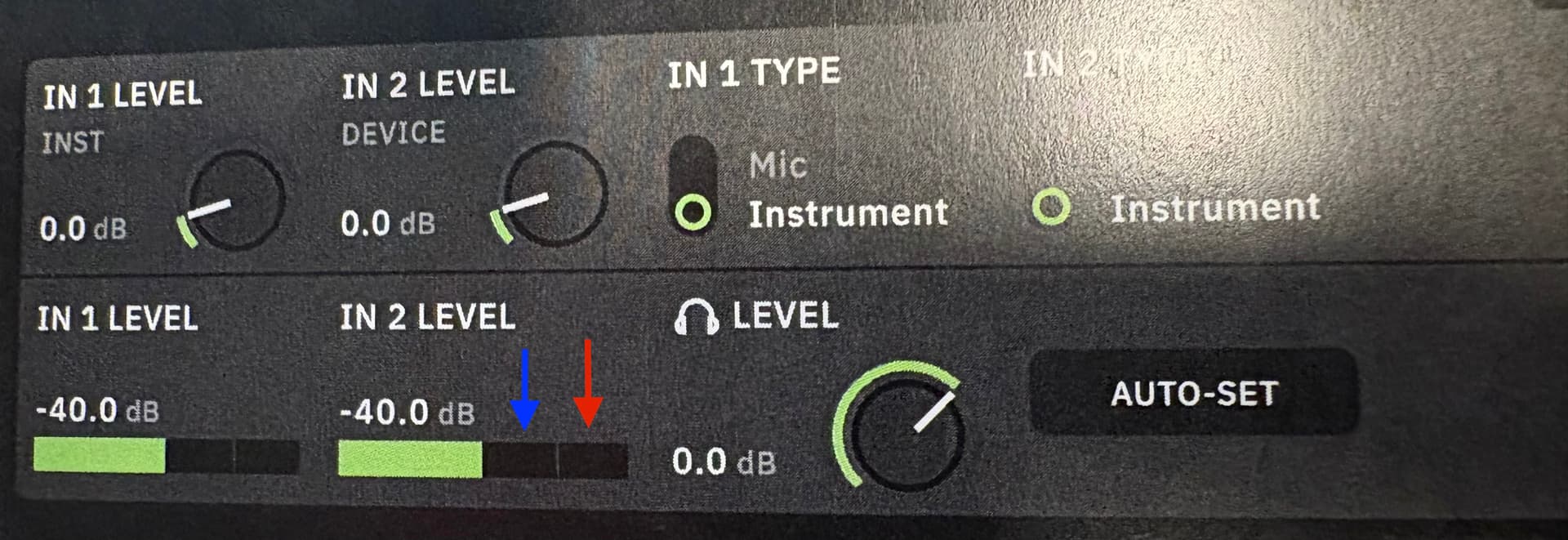
I’ve attached a pic of the meters from the users manual.

Where should my levels be when capturing? Closer to the red arrow or around the blue arrow?

Thanks for the input!

Your levels should be set to just below clipping (red). You can try AUTO-SET but I have always got the best results with manual settings.

will do. I don’t suppose I can go into the capture AFTER THE FACT and beef up it’s levels, can i?

Once you select your capture and place it on the signal grid, you can adjust the gain and EQ (with varying results). Usually you would use a gain block prior to your capture to bump the levels if needed but it depends on how you are configuring your preset and have I/O configured. Essentially, you don’t want to modify a capture block gain or EQ as it will change the overall tone of your amp/drive capture but it’s easy to do and you may like the results.

Gotcha. Looks like I’ll have to recapture with the input up more.

1 Like

Agreed, I would start there and see if you are satisfied with the results. Assuming by your screenshot that you are using line out from your amp etc., some have used a DI box for better results but it certainly isn’t required. Hopefully, someone will add to your thread better details for capturing your specific amp.

I usually have to raise my input level anywhere from +5dB and above to get a good healthy level.

You’ll notice LOTS of captures on the Cloud are very ‘quiet’- I think it almost always needs a boost to the In2 Level while capturing.

@xush is preaching the gospel with the above comment; the input level seems to always get raised to get a solid capture on the other side of the equals sign. Wish it was something mentioned to me when I first started with the QC
1 Like